
Nine official steps, five things you actually do
The official guide breaks an order into nine steps. Four of them are things HubbuyCN does while you wait. The five that need you are: choose the item, pay for it, wait for the check, submit a waybill and pay the freight, then receive the box and inspect it properly.
Everything below follows that order. Where a number matters we point at the official page rather than repeating a figure that could be out of date by the time you read this.
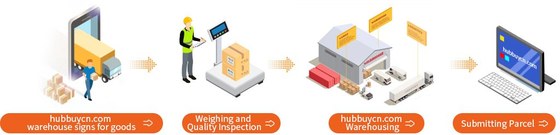
From a link to a paid order
You need an account from the payment step onwards, but you can price the whole thing first.
Get the item into HubbuyCN
Search for it, paste its link, or fill the details in by hand. Which one depends on what you already have, and the chooser on the routes page will tell you.
Check the variant against the original listing
Colour, size and quantity come from the seller and default to whatever was first. This is where wrong variants get ordered.
Pay for the goods
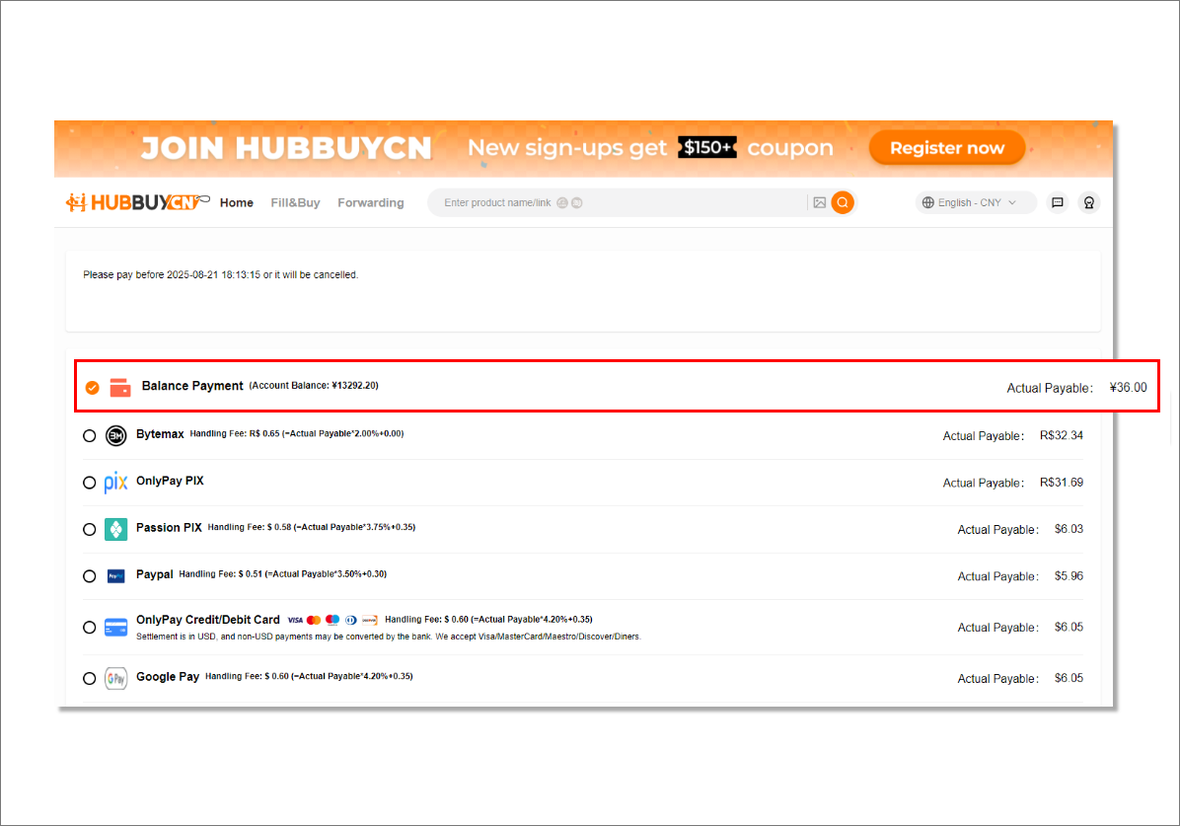
This first payment covers the item price and its domestic shipping to the warehouse. The checkout is settled in USD, and the interface notes that non-USD payments may be converted by your own bank.
HubbuyCN buys it for you
A buyer places the order with the seller on your behalf. Nothing is required from you here except patience.
The seller ships to the warehouse
Domestic delivery inside China. The item is signed for, checked in and matched to your order.
Money, part one
What the first payment does and does not include
The official fees page states the structure plainly: the total is goods cost plus international freight plus any customs charges, where goods cost means the price plus domestic shipping from the seller to the warehouse. Customs declaration is a separate small fixed amount that depends on the shipping method.
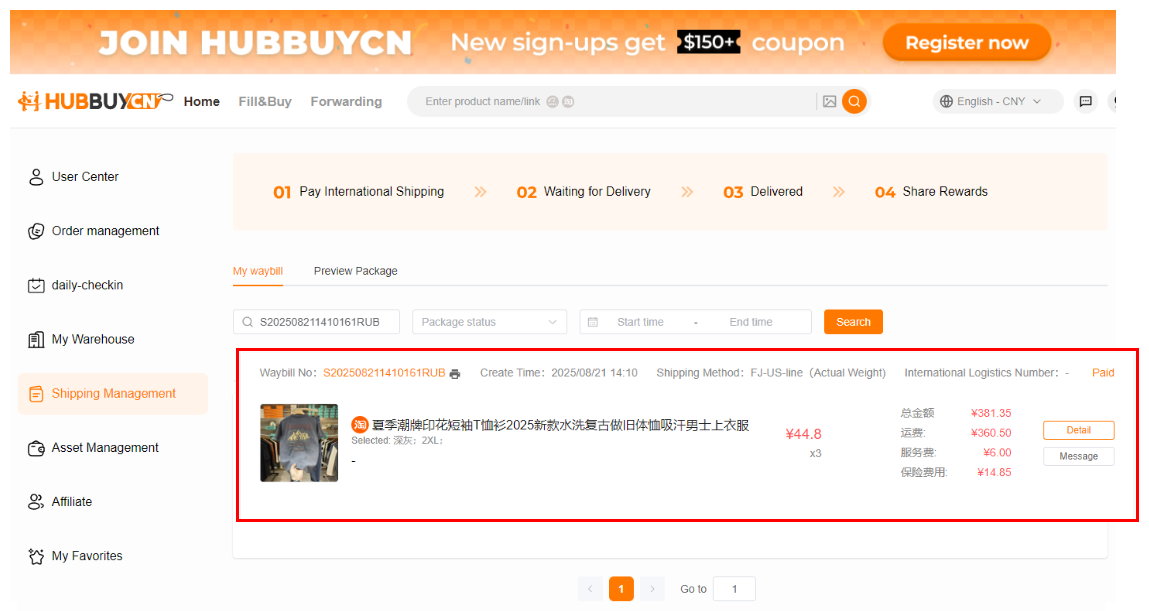
The same page says HubbuyCN charges no extra handling fee beyond goods and freight, and that value added services are opt in. Read that sentence next to a real waybill, though: the waybill screen itemises a service fee and an insurance fee alongside the freight. We are not going to tell you what that service line is, because the official pages do not, and guessing is how wrong facts get into guides like this one.
Paying from outside the card world
The tutorial captured on 1 August 2026 shows card, PayPal, PIX and cryptocurrency channels. Those historical choices do not establish current availability. Confirm the payment options, settlement currency, fees and active account portal at the current checkout before adding funds.
If you are in Latin America, that is the difference between an agent you can use and one you cannot. Each channel shows its own fee rate on that screen, and the settlement currency is USD, so your own bank may add a conversion on top. Check the rate next to the channel before you pick one.

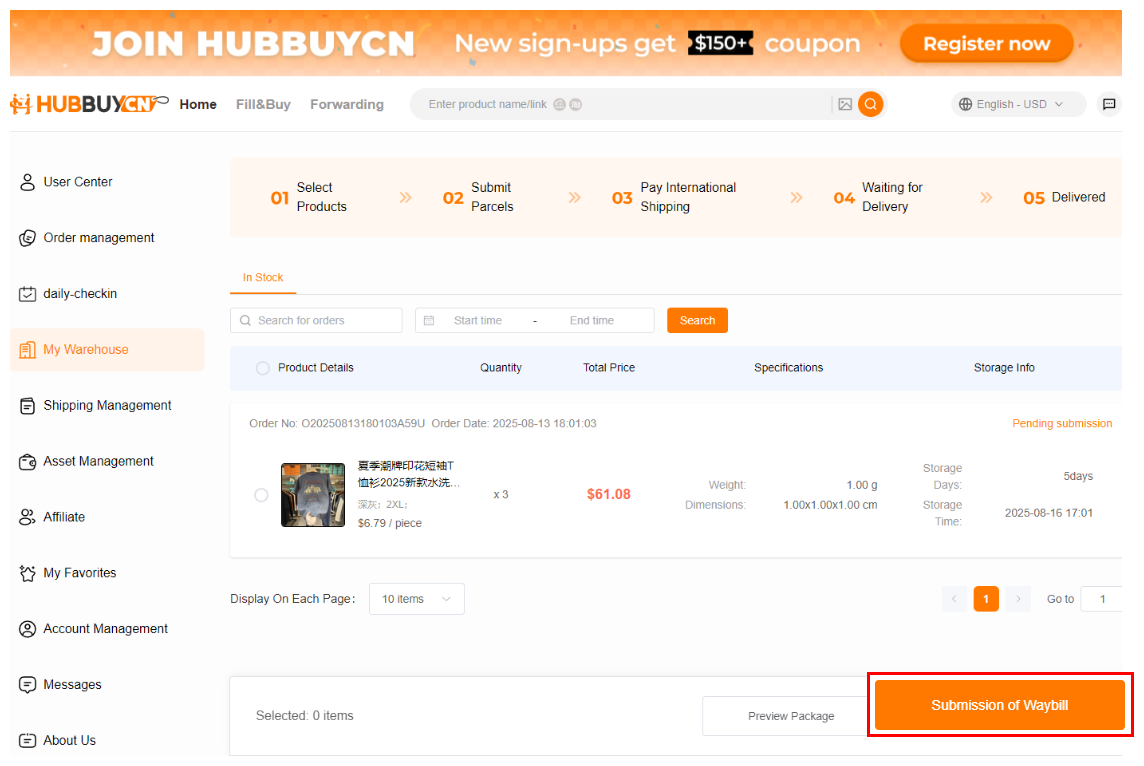
What My Warehouse shows you
Once an item is checked in it appears here with its recorded weight, its volume and how long it has been in storage. The progress strip across the top is the whole journey: select products, submit parcels, pay international shipping, wait, delivered.
This screen is where you decide what travels together. Items from different orders can go into one box, which is the entire economic argument for using an agent rather than having four sellers post four parcels.
Money, part two
Submitting a waybill and paying the freight
You tick the items, choose a route and pay. The freight is calculated from weight, shipping method and destination, according to the official fees page. Some routes refuse liquids, batteries or pressurised goods entirely, so the list of routes you are offered depends on what is in the box.
The waybill screen then shows the line named route, the weight basis it used, and a cost breakdown. Look at it before you confirm rather than after, because the route you pick is the last decision that meaningfully changes what this order costs.
When waiting to consolidate can help

The recorded policy provides a storage window, which can let several items travel together. Check the actual deadline for each order and compare combined versus separate quotes; waiting does not guarantee a lower total.
The exception is a parcel the warehouse cannot match to an order, which the same page puts on a much shorter clock counted from the day it was signed for. That is a forwarding problem, not a buying one.
Arrival
What to do in the first five minutes
These come from the official receiving guidelines and compensation pages, and they are the difference between a claim that can be made and one that cannot.
Check the box before you sign
Check the outside packaging and seals before signing where the delivery service allows. Photograph visible damage and follow the carrier’s damage notation or refusal procedure. Keep packaging and inspect the contents promptly.
If you did not sign in person
Keep the original packaging and get your evidence together quickly. The official page sets a short window in working days for damage reported after the fact, with invoice and photographs.
Raise anything else fast
Problems found after a normal signature have their own deadline on the same page, measured in hours rather than days. After that the order is treated as closed.
Know what is not covered
The compensation page lists the cases it will not pay: force majeure, claims that cannot be evidenced, prohibited goods seized, an intact outer box with contents missing, and customs seizure among them.
How to check the QC photos while the box is still open
These pictures land during the only window where acting on them is cheap: the item is in the warehouse, nothing has flown anywhere, and a complaint costs a message. Compare them against the note you wrote when ordering. Comparing them against the listing only demonstrates that the seller was consistent with itself.
| Look at | What the picture settles | What stays unanswered |
|---|---|---|
| Accessories and parts | Presence. A strap, a dust bag, a spare button, the box it came in. Missing parts fall squarely inside the appearance check. | Whether the included part is the correct one where two versions look alike. |
| Printing and engraving | The exact characters that ended up on the item, which is where a name arrives spelled the way a listing spelled it. | Placement and proportion. Nobody signed off on where it would sit. |
| Variant markings | The label against your order. Model, style and size is the stated scope, so this comparison is the one the service is built for. | Fit. A label can be verified; your measurements were never collected. |
| Surface and construction | Seams, soles, hardware, finish. An appearance check is genuinely good here and this is most of its value. | Anything beneath a seal, which is left closed. |
| Whether it functions | Nothing at all. No photograph reaches this. | Everything. Function sits outside the scope in writing, so an order that depends on it carries that risk the whole way. |